| Mode Control Panel |
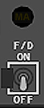
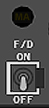
Flight Director (F/D) Switch
Left F/D switch activates command bar(s) on the Captain’s attitude
indicator. Right F/D switch activates command bar(s) on the First Officer’s
attitude indicator.
ON –
Left F/D switch activates command bar(s) on the Captain’s attitude
indicator. Right F/D switch activates command bar(s) on the First Officer’s
attitude indicator.
ON –
- In flight with A/P ON and F/Ds OFF, turning a F/D switch ON
engages F/D in currently selected A/P modes. - Displays FD in A/P status display if A/P is OFF or engaged in CWS.
- Enables command bar display on related pilot’s attitude indicator
- Command bars are displayed if command pitch and/or roll modes
are engaged. - Command bars are displayed if command pitch and roll modes are
engaged.
- On the ground, arms pitch and roll modes for engagement in
TO/GA and wings level when TOGA switch is pushed. - On the ground, arms pitch and roll modes for engagement in
TO/GA and HDG SEL when TOGA switch is pushed.
OFF – command bar(s) retract from related pilot’s attitude indicator.
Master (MA) Flight Director Indicators (white letters)
If a F/D switch is ON, the light indicates which FCC is controlling the F/D
modes.
- Illuminated – related FCC is controlling F/D modes.
- Extinguished – F/D modes are controlled from opposite FCC
- Both lights illuminated – each FCC is controlling modes for related
F/D.



Collins MCP


Glareshield - MCP 700/800/900

